
Template preview
Open full ↗
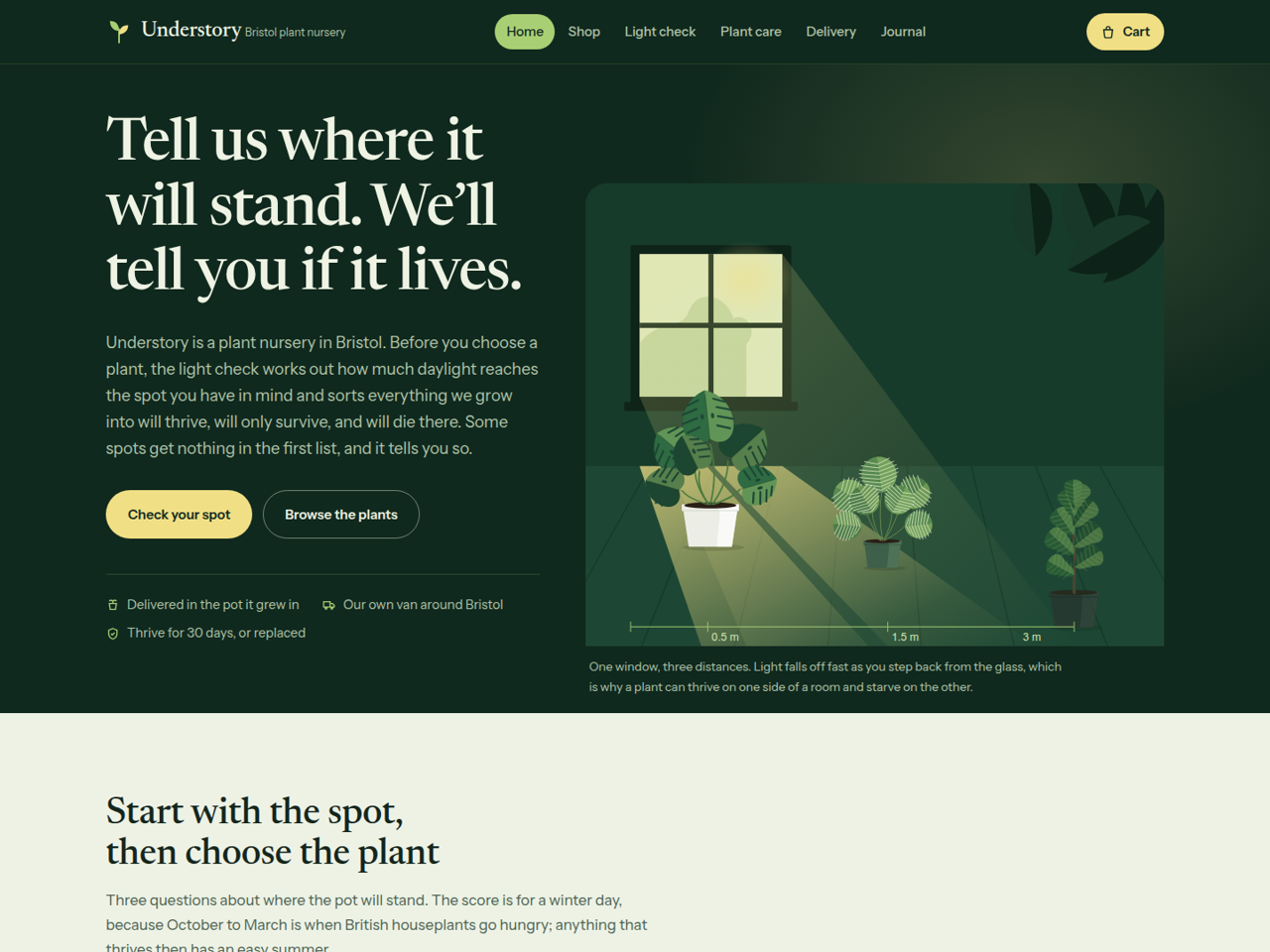
Toko Online
Houseplants
"Use" opens the PageHub dashboard so you can start from this template.
- Category
- Toko Online
- Type
- Multi-page website
- Pages
- 4
- Online store
- Included
- Published
- 16 November 2026
- Used
- Never used
Houseplants is a complete online shop for a plant nursery: four pages plus catalogue, product page, cart, checkout and a journal. It is built around the question every plant buyer skips, can the spot I have in mind keep this plant alive?, and a shop that answers it before taking the money, including when the answer is no.
Pages included
Home — a hand-drawn room in section (one window, three plants at three distances) beside the headline, the light check working right on the page, two live product strips (featured and newest), a section explaining the three labels on every card, a dark band with the 30-day thrive promise and what it excludes, and delivery in three columns.
Light check — the signature tool. Window direction × distance from the glass × what is in the way gives a winter light score out of 100, and every plant in the shop is sorted into will thrive, will only survive and will die here. Plants that scorch are moved down a list where direct sun reaches. When nothing will do well it says so plainly, then looks for the smallest change that helps (a closer spot, the net curtain down) and, if none does, suggests a grow light instead of a plant. The page also prints the three factor tables, a worked example, every plant’s needs in one table, and what the check cannot see.
Plant care — the care scale leaf by leaf, what “toxic to pets” actually means (and the lily warning), watering by weight, and an FAQ.
Delivery — zones and prices, how a plant is packed, the cold-weather hold, the full promise terms, collection and returns, plus a question form.
Shop, product, cart, checkout — cards and product pages show light need, care difficulty and pet safety automatically; the product page also works out, for each window direction, how far from the glass the plant grows well.
Journal — three posts: north windows, pets and plants, and the first fortnight after delivery.
Design and style. Deep shade greens with sunlit yellow-green highlights, Newsreader over Instrument Sans, leaf-shaped image corners, and hand-drawn botanical illustrations of every plant in the catalogue. The shared script carries the menu, the light check, the card labels, the product-page panel, the gallery and accordions, all vanilla and null-guarded.
Before you publish. One table at the top of script.js holds every plant’s light needs, care level and pet safety; cards find their entry by product name, so a plant you rename or add needs a line there or it simply shows no labels. The same numbers are printed in the table on the Light check page, so change both. The 30-day promise, the 2°C cold hold and the delivery prices are commitments customers will hold you to. Forms use named inputs with no action attribute, so PageHub attaches the handler on publish; sample products and articles are for the preview only.
Best suited to plant shops and nurseries, florists, garden centres, and any shop whose product only works in the right conditions and which would rather say so before the sale.
Pages included
Home — a hand-drawn room in section (one window, three plants at three distances) beside the headline, the light check working right on the page, two live product strips (featured and newest), a section explaining the three labels on every card, a dark band with the 30-day thrive promise and what it excludes, and delivery in three columns.
Light check — the signature tool. Window direction × distance from the glass × what is in the way gives a winter light score out of 100, and every plant in the shop is sorted into will thrive, will only survive and will die here. Plants that scorch are moved down a list where direct sun reaches. When nothing will do well it says so plainly, then looks for the smallest change that helps (a closer spot, the net curtain down) and, if none does, suggests a grow light instead of a plant. The page also prints the three factor tables, a worked example, every plant’s needs in one table, and what the check cannot see.
Plant care — the care scale leaf by leaf, what “toxic to pets” actually means (and the lily warning), watering by weight, and an FAQ.
Delivery — zones and prices, how a plant is packed, the cold-weather hold, the full promise terms, collection and returns, plus a question form.
Shop, product, cart, checkout — cards and product pages show light need, care difficulty and pet safety automatically; the product page also works out, for each window direction, how far from the glass the plant grows well.
Journal — three posts: north windows, pets and plants, and the first fortnight after delivery.
Design and style. Deep shade greens with sunlit yellow-green highlights, Newsreader over Instrument Sans, leaf-shaped image corners, and hand-drawn botanical illustrations of every plant in the catalogue. The shared script carries the menu, the light check, the card labels, the product-page panel, the gallery and accordions, all vanilla and null-guarded.
Before you publish. One table at the top of script.js holds every plant’s light needs, care level and pet safety; cards find their entry by product name, so a plant you rename or add needs a line there or it simply shows no labels. The same numbers are printed in the table on the Light check page, so change both. The 30-day promise, the 2°C cold hold and the delivery prices are commitments customers will hold you to. Forms use named inputs with no action attribute, so PageHub attaches the handler on publish; sample products and articles are for the preview only.
Best suited to plant shops and nurseries, florists, garden centres, and any shop whose product only works in the right conditions and which would rather say so before the sale.
No reviews yet. Reviews come from people who actually used this template.