
Xem trước mẫu
Mở toàn màn hình ↗
Chung
SaaS Pricing Page
“Dùng” sẽ mở bảng điều khiển PageHub để bạn bắt đầu từ mẫu này.
- Danh mục
- Chung
- Loại
- Landing page
- Đăng ngày
- 1 tháng 9 2026
- Đã dùng
- Chưa từng dùng
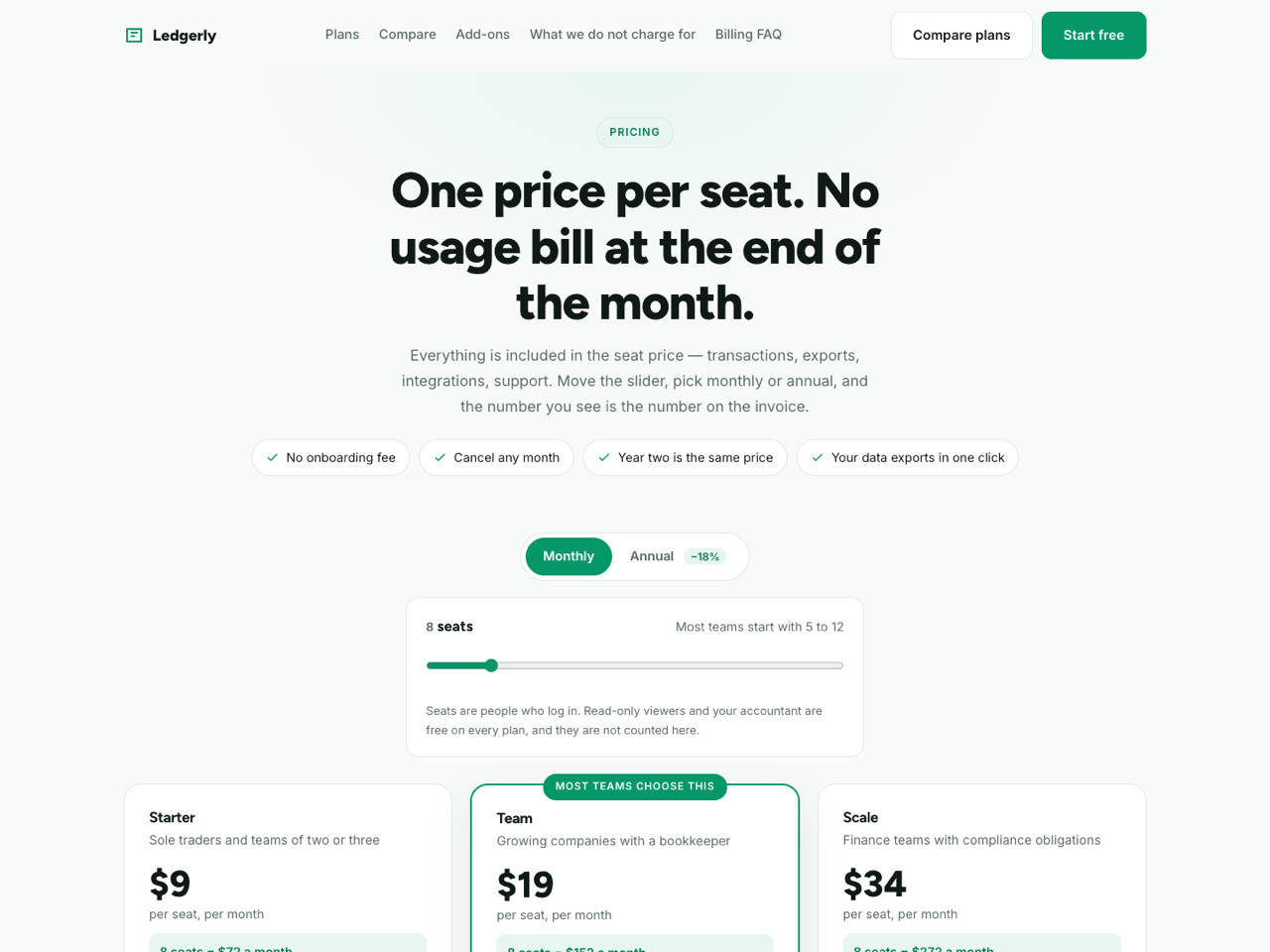
SaaS Pricing Page is the page that decides most software purchases, and its job is not persuasion but arithmetic: let the reader work out their own number and then believe it. So the plans are driven by a seat slider and a billing toggle that recalculate together, and the sections that usually get left out — what is never charged for, and what happens when you leave — are given their own space.
Sections, in order
Sticky navbar with anchors and a trial button.
Hero — a plain statement of the pricing model with four promise chips (no onboarding fee, cancel any month, year two costs the same, one-click export).
Controls — a monthly/annual toggle carrying the saving, and a seat slider whose note changes as you drag it, suggesting which plan fits that team size.
Three plans — per-seat price, who each is for, and a live monthly total for the chosen seat count so nobody has to multiply in their head.
Full comparison table — grouped into daily work, control and security, and a third group headed "leaving, if you want to", which is where export, attachments, read-only access after cancelling and free migration help live.
Add-ons — three, each with a printed price rather than "contact us".
Four things that never appear on your bill — a dark band naming usage fees, onboarding charges, paid support tiers and export fees.
Billing FAQ — eight questions: what a seat is, mid-month changes, price locks, bank transfer, upgrading mid-term, why there is no free plan, discounts, and how to cancel.
Trial CTA — a short form with team size and a "do you want help setting up" selector.
Design and style. Calm and financial: emerald on a cool off-white, Figtree over Inter, a highlighted middle plan, a grouped comparison table with a dark header, and one dark band for the billing promises. Seat slider, billing toggle, FAQ accordion, scroll reveal and mobile menu are vanilla JavaScript.
Before you publish. Prices live in data-monthly and data-annual attributes on each plan's amount — change them there, not in the visible text, or the first slider drag will overwrite whatever you typed. Keep the annual saving in the toggle consistent with the two numbers, since a reader who checks the arithmetic and finds it wrong stops trusting the rest of the page. Rewrite the comparison table to your own product before anything else; and if you cannot honestly make the four "never charged" claims, delete that section rather than softening it. The form uses named inputs with no action attribute, so PageHub attaches the handler on publish and trial requests arrive in Form Submissions with team size and setup preference attached.
Best suited to SaaS and per-seat software, subscription tools and platforms, agencies with retainer tiers, membership products, and any business whose buyers arrive at the pricing page already knowing what they want.
Sections, in order
Sticky navbar with anchors and a trial button.
Hero — a plain statement of the pricing model with four promise chips (no onboarding fee, cancel any month, year two costs the same, one-click export).
Controls — a monthly/annual toggle carrying the saving, and a seat slider whose note changes as you drag it, suggesting which plan fits that team size.
Three plans — per-seat price, who each is for, and a live monthly total for the chosen seat count so nobody has to multiply in their head.
Full comparison table — grouped into daily work, control and security, and a third group headed "leaving, if you want to", which is where export, attachments, read-only access after cancelling and free migration help live.
Add-ons — three, each with a printed price rather than "contact us".
Four things that never appear on your bill — a dark band naming usage fees, onboarding charges, paid support tiers and export fees.
Billing FAQ — eight questions: what a seat is, mid-month changes, price locks, bank transfer, upgrading mid-term, why there is no free plan, discounts, and how to cancel.
Trial CTA — a short form with team size and a "do you want help setting up" selector.
Design and style. Calm and financial: emerald on a cool off-white, Figtree over Inter, a highlighted middle plan, a grouped comparison table with a dark header, and one dark band for the billing promises. Seat slider, billing toggle, FAQ accordion, scroll reveal and mobile menu are vanilla JavaScript.
Before you publish. Prices live in data-monthly and data-annual attributes on each plan's amount — change them there, not in the visible text, or the first slider drag will overwrite whatever you typed. Keep the annual saving in the toggle consistent with the two numbers, since a reader who checks the arithmetic and finds it wrong stops trusting the rest of the page. Rewrite the comparison table to your own product before anything else; and if you cannot honestly make the four "never charged" claims, delete that section rather than softening it. The form uses named inputs with no action attribute, so PageHub attaches the handler on publish and trial requests arrive in Form Submissions with team size and setup preference attached.
Best suited to SaaS and per-seat software, subscription tools and platforms, agencies with retainer tiers, membership products, and any business whose buyers arrive at the pricing page already knowing what they want.
Chưa có đánh giá. Đánh giá đến từ những người thật sự đã dùng mẫu này.