
Xem trước mẫu
Mở toàn màn hình ↗
Webinar & Event
Event Ticket
“Dùng” sẽ mở bảng điều khiển PageHub để bạn bắt đầu từ mẫu này.
- Danh mục
- Webinar & Event
- Loại
- Landing page
- Đăng ngày
- 1 tháng 9 2026
- Đã dùng
- Chưa từng dùng
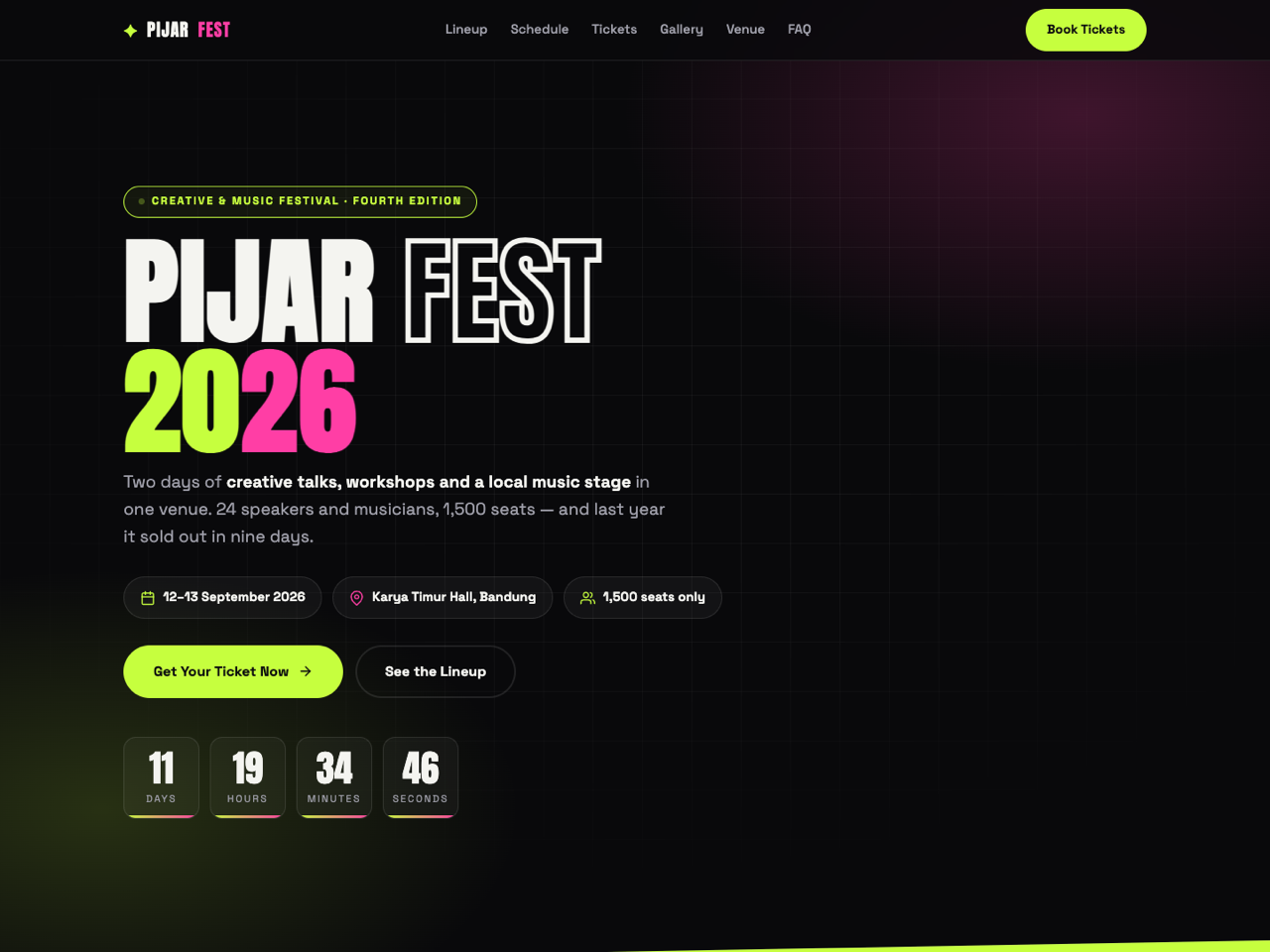
Event Ticket is a landing page for a multi-day festival or conference, built around the two things that actually sell a ticket: knowing exactly what happens when, and knowing the price will rise.
Sections, in order
Sticky navbar with anchors and a booking button.
Hero — edition badge, oversized festival name, a subhead that states the format plainly, date/venue/capacity chips, two calls to action, and a live countdown to day one.
Lineup — eight speaker and performer cards with photo, role badge (keynote, workshop, live music, closing party) and affiliation.
Programme — a working day switcher between two full agendas, each entry with its time, title, description and room. This is the section that turns interest into a decision.
Ticket tiers — three prices with a struck-through original, a highlighted top tier, per-tier feature lists that also show what a tier does not include, and the transfer and refund policy stated in plain words.
Reasons to come — four cards, including the previous year's rating and the fact that returning attendees bought before the lineup was announced.
Last year's gallery — an eight-image mosaic with three headline statistics beneath it.
Venue — the building's story, address, shuttle arrangements, parking capacity and facilities, beside a map block.
FAQ — six questions covering ticket validity, payment, transfers, workshop booking, cameras and bad weather.
Booking section — three reassurance lines beside a form with a tier selector that repeats the prices.
Design and style. Hot magenta and amber on near-black, oversized display type, and a mosaic gallery — the visual energy of a festival poster held together by a strict grid. Countdown, day switcher, FAQ accordion and mobile menu are all vanilla JavaScript.
Before you publish. Set the countdown date in the script, then keep it consistent with the date chips, the two agenda tabs and the closing CTA. Update the tier prices in both the pricing cards and the form's tier dropdown. The form has named inputs and no action attribute, so PageHub attaches the handler on publish and bookings arrive in Form Submissions, ready for you to invoice.
Best suited to festivals, conferences, expos, workshops with several tracks, community meet-ups, or any ticketed event whose programme is the reason to attend.
Sections, in order
Sticky navbar with anchors and a booking button.
Hero — edition badge, oversized festival name, a subhead that states the format plainly, date/venue/capacity chips, two calls to action, and a live countdown to day one.
Lineup — eight speaker and performer cards with photo, role badge (keynote, workshop, live music, closing party) and affiliation.
Programme — a working day switcher between two full agendas, each entry with its time, title, description and room. This is the section that turns interest into a decision.
Ticket tiers — three prices with a struck-through original, a highlighted top tier, per-tier feature lists that also show what a tier does not include, and the transfer and refund policy stated in plain words.
Reasons to come — four cards, including the previous year's rating and the fact that returning attendees bought before the lineup was announced.
Last year's gallery — an eight-image mosaic with three headline statistics beneath it.
Venue — the building's story, address, shuttle arrangements, parking capacity and facilities, beside a map block.
FAQ — six questions covering ticket validity, payment, transfers, workshop booking, cameras and bad weather.
Booking section — three reassurance lines beside a form with a tier selector that repeats the prices.
Design and style. Hot magenta and amber on near-black, oversized display type, and a mosaic gallery — the visual energy of a festival poster held together by a strict grid. Countdown, day switcher, FAQ accordion and mobile menu are all vanilla JavaScript.
Before you publish. Set the countdown date in the script, then keep it consistent with the date chips, the two agenda tabs and the closing CTA. Update the tier prices in both the pricing cards and the form's tier dropdown. The form has named inputs and no action attribute, so PageHub attaches the handler on publish and bookings arrive in Form Submissions, ready for you to invoice.
Best suited to festivals, conferences, expos, workshops with several tracks, community meet-ups, or any ticketed event whose programme is the reason to attend.
Chưa có đánh giá. Đánh giá đến từ những người thật sự đã dùng mẫu này.