v4.14 LET and LAMBDA are in. Read the release

What changed in Quillsheet, release by release

Every change you could notice, with the date it shipped and the part of the product it touches. Removals get a schedule. The roadmap keeps its doubts in, because you plan work around it.

Changelog

Five releases, one every other Wednesday. Highlighted rows shipped after your last visit. Filter by kind of change or by the part of Quillsheet you use; the row numbers turn blue when a filter is hiding rows, the same as in a sheet.

=FILTER(changes)

v4.14

Formulas you can name, faster pasting from Excel, and the start of the v1 API's retirement.

  1. NewFormulas

    LET and LAMBDA work in every cell

    Name an intermediate result once and reuse it: =LET(rate, B2/12, PMT(rate, 360, -C2)). A LAMBDA saved to a workbook shows up in autocomplete for everyone with edit access, with the name of the person who wrote it.
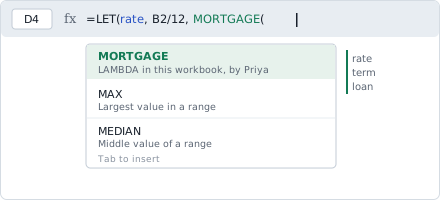
    Formula bar showing a LET formula, with autocomplete offering a saved LAMBDA called MORTGAGE
  2. ImprovedGrid and editing

    Pasting 50,000 rows from Excel takes about 2 seconds

    It took 11 on the same test sheet in v4.13 (a 14-column ledger, Chrome on a 2022 laptop). Formatting is now applied after the values land instead of cell by cell.

  3. FixedCollaboration

    Comments follow their cell through a sort

    Sorting a range left comments on the old row number, attached to someone else's data. Reported by 31 teams; it has been wrong since comments launched in v3.2.

  4. DeprecatedAPI

    The v1 /sheets/{id}/values endpoint is being retired

    It becomes read-only on 1 February 2027 and stops answering on 1 May 2027. The v2 /ranges endpoint does the same job and accepts the same tokens. Owners of tokens that called v1 in the last 30 days have been emailed.
v4.13

Follow a colleague around a sheet, a formula row on the iOS keyboard, and two import bugs.

  1. NewCollaboration

    Follow mode

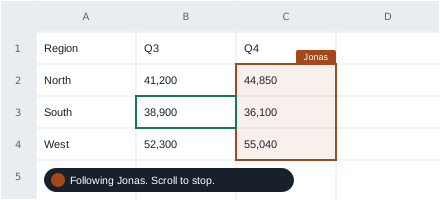
    Click a collaborator's avatar and your view tracks their selection, across sheets, until you scroll or click. Useful on a call when someone says "look at row 40" and half the room is on another tab.

    A sheet with a colleague's selection outlined and a banner reading Following Jonas, scroll to stop
  2. ImprovedMobile apps

    A formula row on the iOS keyboard

    Keys for = ( ) : and $ sit above the letters while you edit a cell, so writing a formula no longer means switching layouts four times. Android gets the same row in v4.15.

  3. FixedFormulas

    XLOOKUP over merged cells

    It returned #N/A when the lookup range contained merged cells. It now reads the top-left value of the merge, which is what Excel does.

  4. FixedImport and export

    UTF-16 CSV files import as text again

    Files saved as "Unicode Text" by Excel 2016 and earlier came in as rows of question marks. We now detect the encoding before reading the first line.

v4.12

Charts inside cells, frozen panes that belong to you, and the end of new 3D pie charts.

  1. NewCharts

    Sparklines

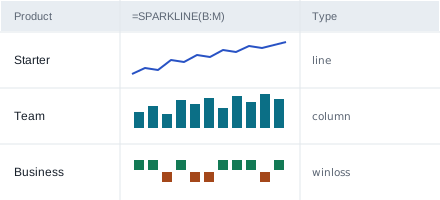
    =SPARKLINE(B2:M2) draws a line, column or win/loss chart inside the cell. They resize with the column and print at the cell's size.

    Three rows of monthly figures, each with a small line, column or win-loss chart inside one cell
  2. ImprovedGrid and editing

    Frozen panes are per person

    Freezing column A used to freeze it for the whole team. It now applies to your view only. Owners can still set a default for people who haven't chosen.

  3. DeprecatedCharts

    3D pie charts

    You can no longer create one. Existing charts keep rendering until 1 March 2027, when we convert them to flat pies with the same data and colours. Owners get an email 30 days before.

v4.11

A better way in from Google Sheets, an undo bug, and more headroom on the API.

  1. NewImport and export

    Google Sheets import keeps your rules

    Conditional formatting and data validation now come across with the values. Apps Script does not, and won't: the import report lists every script it skipped so you know what to rebuild.

  2. FixedGrid and editing

    Undo after fill-down

    Pressing undo once after a fill-down sometimes reversed the action before it too. One undo now reverses one action.

  3. ImprovedAPI

    Rate limit raised to 300 requests a minute

    Up from 60, per token, on Team and Business plans. The free plan stays at 60.

v4.10

A data-loss bug in shared editing, readable formula errors, and notice for Android 9.

  1. FixedCollaboration

    Two people typing in one cell could blank it

    If two edits reached the server within a second, the cell could end up empty. The last edit now wins and the other is kept in version history. This one lost data, so we emailed the 212 workspaces where it happened.

  2. ImprovedFormulas

    Errors say which argument is wrong

    Instead of #VALUE! you get "SUMIFS: criteria_range2 is 40 rows, sum_range is 41". The cell still shows the error code, so other formulas that test for it keep working.

  3. DeprecatedMobile apps

    Android 9 support ends with v4.16

    v4.16 is planned for January 2027. The app keeps working on Android 9 after that, but it stops receiving updates, including security fixes.

Older releases, v4.0 to v4.9, are in the archive. Every entry above is also in the RSS feed.

What we're removing, and when

Each removal stays in this table from the day we announce it until the day it happens. If a date moves, it moves later, and the old date stays visible with a line through it.

ItemAnnouncedFirst changeRemovedWhat to do
API v1 /sheets/{id}/values11 Nov 20261 Feb 2027
read-only
1 May 2027Move calls to v2 /ranges. Same tokens, same JSON shape for values.
3D pie charts14 Oct 202614 Oct 2026
no new charts
1 Mar 2027Nothing. We convert them to flat pies. Convert sooner from the chart menu if you want to check the result.
Android 9 app updates16 Sep 2026v4.16
last update
January 2027Keep using the app, or use quillsheet.app in the browser, which supports Android 9 with Chrome 110 or later.

Minimum notice is 90 days from announcement to removal. All three above give more than that; the shortest is the Android change, at 107 days or more depending on the January date.

Roadmap

Now means someone is building it. Next means it is designed and waiting for a team. Later means we want it and have no plan. Where something might not ship, we say what would stop it.

Now

In development, aimed at v4.15 and v4.16

Grid and editinghigh

Group pivot dates by week, month or quarter

Drag a date field into rows and choose the bucket. Working in internal builds; fiscal years that start in April are the last piece.

Grid and editingmedium

Offline editing in the browser

Edit with no connection and sync when you're back.

Might not ship as described. Merging two offline copies of the same cell is unsolved. If it isn't reliable by v4.16, we ship read-only offline first.

Next

Designed, not started

APIhigh

Webhooks on cell change

Get a POST when a watched range changes, batched per second so a paste of 10,000 rows sends one call, not 10,000.

Collaborationlow

Row-level permissions

Let a person edit only the rows assigned to them.

Might not ship. Locked rows break sort and filter in ways we haven't designed around. The fallback is better protected ranges, which is less than what was asked for.

Later

Wanted, no plan yet

Import and exportlow

Two-way sync with Excel files

Edit the same .xlsx in Excel desktop and Quillsheet.

Depends on file locking in OneDrive and SharePoint that we don't control. If Microsoft doesn't open it up, this stays here.

Platformlow

Self-hosted Quillsheet

Our second most requested item. Unlikely before 2028: it needs a separate release process and a support team we don't have.

Not planned

Running VBA macros. Quillsheet won't execute VBA from imported files, for security reasons we don't expect to change. The scripting API covers most of what macros are used for, and the import report lists each macro it skipped.

How we write this page

A changelog is only useful if you can predict what goes in it. These are the rules the product team signs up to.

A release every other Wednesday

Fixes that can't wait go out in between and appear in the next release's notes, marked fixed, with the date they actually shipped.

Everything you could notice

If it changes what you see, type or get back from the API, it's listed. Internal refactors and library upgrades are left out unless they change behaviour.

Ninety days before anything is removed

Plus an email to the owners of every workspace that used it in the last 30 days, and a row in the removals table until the day it goes.

Mistakes stay on the record

If a release broke something, its note says so and links the fix. We don't rewrite old entries; corrections are added underneath with a date.

Get release notes by email

One email per release, or one a month, or only the removals. Choose the areas you use and the rest stays out of your inbox.

What the v4.14 email looked like, filtered to API:
  • Deprecated: v1 values endpoint, read-only 1 Feb 2027, removed 1 May 2027
  • Link to the migration guide and a list of your tokens that still call v1
How often
Areas you use

Release notes only, no marketing. Every email has a one-click unsubscribe link.

Questions about this page

Anything else goes to product@quillsheet.example. A person on the product team reads it.

How does "since your last visit" know when I was here?

Your browser keeps the date of your last visit to this page. It is never sent to us, it isn't tied to your Quillsheet account, and clearing site data or using another browser resets it. "Mark all as read" sets it to today.

Is there an RSS feed?

Yes, with one item per change rather than per release, so a feed reader can filter by the same types and areas as this page.

Can I vote on the roadmap?

Not with votes. Request counts helped us rank items, but the loudest requests came from the largest accounts. Tell us what you are trying to do and what it costs you today; that changes the order more than a tally does.

Something I rely on is in the removals table. What now?

Reply to the email you got about it, or write to us. If you can't move before the date, say so before the first change; we have pushed dates back twice when customers showed us why.

Where do I report a bug?

Help, then Report a problem, inside Quillsheet. It attaches the sheet version and browser details we need. Fixed bugs reported by customers are credited here by count, never by name.